So after months of dealing with problems trying to get the stuff I want to host working on my Raspberry Pi and Synology, I’ve given up and decided I need a real server with an x86_64 processor and a standard Linux distro. So I don’t continue to run into problems after spending a bunch more, I want to seriously consider what I need hardware-wise. What considerations do I need to think about in this?
Initially, the main things I want to host are Nextcloud, Immich (or similar), and my own Node bot @[email protected] (which uses Puppeteer to take screenshots—the big issue that prevents it from running on a Pi or Synology). I’ll definitely want to expand to more things eventually, though I don’t know what. Probably all/most in Docker.
For now I’m likely to keep using Synology’s reverse proxy and built-in Let’s Encrypt certificate support, unless there are good reasons to avoid that. And as much as it’s possible, I’ll want the actual files (used by Nextcloud, Immich, etc.) to be stored on the Synology to take advantage of its large capacity and RAID 5 redundancy.
Is a second-hand Intel-based mini PC likely suitable? I read one thing saying that they can have serious thermal throttling issues because they don’t have great airflow. Is that a problem that matters for a home server, or is it more of an issue with desktops where people try to run games? Is there a particular reason to look at Intel vs AMD? Any particular things I should consider when looking at RAM, CPU power, or internal storage, etc. which might not be immediately obvious?
Bonus question: what’s a good distro to use? My experience so far has mostly been with desktop distros, primarily Kubuntu/Ubuntu, or with niche distros like Raspbian. But all Debian-based. Any reason to consider something else?
N100 is a very good choice. Used can be top or flop. Up to you if you want to take the risk/chance.
ubuntu is a solid distro, especially since you have knowledge with it.
When I bought a N100 I installed fedora and love it much more than ubuntu because of auto updates without problems, cockpit, podman and selinux.
If your proxy works, then let it work. If you have to maintain it, or set up a new system, I recommend switching to caddy because it’s just so easy.
I would switch ubuntu for debian, but that is more personal preference. As they are mostly the same architecture, there is not much of a learning curve.
What does debian have what ubuntu hasn’t?
Out of curiosity. I’ve got a debian bookworm running but I couldn’t tell a noticable difference between the two
Debian doesn’t advertise in your terminal or install snaps instead of packages.
Canonical also pushes the boundary on what’s acceptable in the Linux community and tends to not play nicely with others if they don’t get to control projects. Not necessarily Microsoft 90s bad, but they’re kind of like that spoiled kid on the playground who will only play the games they want to play and won’t share the playground ball if they get to it first.
So for me, it’s more of a philosophical choice than a functional choice. Debian is more barebones in my experience, which is good and bad depending on your experience level.
Ubuntu is based on Debian, by the nature of that it will have more things than Debian.
Ubuntu generally has more cutting Edge features and tools by the nature of what it is, but the company supporting it also is pushing snap files for compatability containers which may or may not be your cup of tea.
Debians official packages can sometimes be a tad older since their ideology is stability over everything else.
A popular hypervisor distro proxmox uses Debian as the base for it’s great stability.
I second this.
Bought a $150 NGKTech from Aliexpress with 16 GB of RAM a couple of years ago, and it’s been such a beast with Proxmox.
Extremely low power consumption, no fan noise, barely any heat and chugs through Jellyfin transcoding, Minecraft/Valheim servers, HA OS and so many more small containers.
Just remember to set the C-state in BIOS and re-paste the CPU before you fire it up. The stock stuff is crap.I was expecting to outgrow it quite quickly, but it just powers through it all.
I can’t see any reason to get anything more powerful at all.
I had good results with SFF (Small Form Factor) machines, mostly Dell Optiplexes. More space inside while manageably small. Usually a lot of them around as former leasing machines.
I have nothing to compare to, but I recently bought a Dell OptiPlex 9020 for $15/£13. It works wonders. I run a handful docker containers and a VM and haven’t experienced any issue since I bought it. It’s my first time experimenting with a home lab setup.
Oh really interesting. So SFF is a little larger than Mini PC but smaller than standard desktops? Just quickly looking at refurb prices Optiplexes seem to be available a little cheaper than Mini PCs, too.
I currently run a Dell Wyse 5something, that one’s low power but passively cooled. Total silence for Home assistant and related services.
Also bought an Optiplex to run Jellyfin on it. Can recommend it.
Anything can be a “server” in your use-case. Something low power at idle will not cost an arm and a leg to run, and you can always upgrade later if you need more.
Check the Minisforum refurb store and see what you can get for under $150.
Under $150 might be tricky in Australia, but I had a quick look for “mini PC” from a refurb shop near me and came up with one, two, three for options under $230.
Something low idle
I’m guessing that this might be a typo, but I’m not quite sure what it’s meant to read. Or what it means if it’s not a typo.
All of those would be perfectly cromulent nodes for small containers. The first issue you’ll run into is the low ram. Some homelab projects would cause you to exceed 8gb, but the good news is if you’re using an external backend via NFS, you can always scale out (more nodes) or up(more compute per node,) later with minimal headache.
If you’re going to be memory constrained, don’t waste 1-2gb on a gui, install Ubuntu/Debian/whatever headless
Thanks! I genuinely wasn’t sure how much RAM would be necessary, and would have probably seriously considered 8 GB enough if I hadn’t gotten the feedback.
That wasn’t quite the takeaway I was going for. You can get a lot done on 8gb of ram. I was just trying to point out that it would probably be your first bottleneck as you started to scale out, and that you should consider using the server headless to make the ram you have go that much further.
Oh yeah, the “run headless” tip too was great! I would never have used a desktop environment, and would in effect have been using it headless. But had you and others not specifically suggested running it as headless it would probably not have occurred to me that that’s a setting change I’d need to make while installing it.
It definitely can be disabled post-install but is much simpler to install without it at install-time, and has the added benefit of not pulling 2-5gb of other things that won’t be relevant to your use case. It’s not that the disk waste is that big of a deal, but any issues you run into will be that much easier to troubleshoot with fewer moving parts.
Hmmm, it does seem they’ve finally raised prices. Well that’s a huge bummer.
I can’t say the 3 options you posted are really good deals, but maybe that’s just the market in Australia. I’d check to see what the max RAM in those are and upgrade to at least 16GB though. It should still be cheap for non DDR5.
Business mini PCs with a decent amount of ram in them fit your use case well. And mine, which is why I have a bunch of them.
The only time ive seen heat be an issue is when they are stacked - to be clear, airflow on those is usually front to back, the problem is the chimney effect. Heat rises. So stacking can be a problem, but I just stick some thick nylon washers between, its worked quite well sticking them on a shelf in my rack. I generally put them in stacks of two, with two side by side, for a total of four per shelf.
You don’t need to do that right off though with just one.
If you do get a used one, look for units with 16 or more ram, or bump it to 32gb/64gb (model dependant) yourself. There is usually an unused m2 slot, great for a host os to live if you’ve got a spare (prices suck right now to buy), and typically there is a 2.5" data ssd though sometimes its mechanical or one of those hybrids. Useful storage, but use m2 if you can.
I prefer the Intel based units so I can use the igpu for general tasks, and if it has a dgpu (I have a few with a quadro in there) I use that for more dedicated transcoding tasks, or to pass through to a VM. For Jellyfin its using the igpu, no need to pass through if youre using an lxc for example.
Make sure to clean it out when you get it, and check how the fan is working. I’d pull the case, go into the bios, and manually change the fan speed. Make sure its working correctly, or replace it (pretty cheap, the last replacement I bought was ~$15). Any thermal paste in there is probably dried out, so replacing it isnt a bad idea either.
In terms of what to get, I’d lean towards 6th gen or newer intel cpu’s for most utility. One with a dgpu is handy obviously but not a requirement.
Personally I am a Debian guy for anything server. So I put Debian on, no DE, set up how I want. Then I convert to proxmox. If youre not overly specific about your setup (like most people, and how I should probably be but I’m too opinionated), you can just install proxmox.
Proxmox has no desktop environment. Its just a web GUI and the CLI, so once set up you can manage it entirely from another device. Mine connect to video switchers I have to spare, but you can just plug a monitor in temporarily if you need it.
Proxmox community scripts will show lots of options - I dont recommend running scripts off the internet though, but it will show you a lot of easy options for services.
Hope this helps!
Wow thanks, a lot of great advice in here!
I actually do have an old m2 drive sitting around somewhere, if I can find it. I think it was an m2 SATA (not NVMe) drive though, so not sure if there’s any advantage over a 2.5" other than the physical size.
What exactly is proxmox? A distro optimised for use in home servers? What does it do for you exactly that’s better than more standard Debian/Ubuntu?
What exactly is proxmox?
In layman terms, it’s a Debian-based distro that makes managing your virtual machines and lxc containers easier. Thanks to an advanced virtual interface, you can set up most things graphically, monitor and control your VMs and containers at a glance, and just generally take the pain away from managing it all.
It’s just so much better when you see everything important straight away.
I guess I have the same question for you as I did for curbstickle. What’s the advantage of doing things that way with VMs, vs running Docker containers? How does it end up working?
Proxmox can work with VMs and LXC containers.
When you need to always have resources reserved specifically for a given task, VMs are very handy. VM will always have access to the resources it needs, and can be used with any OS and any piece of software without any preparations and special images. Proxmox manages VMs in an efficient way, ensuring near-native performance.
When you want to run service in parallel with other with minimal resource usage on idle, you go with containers.
LXC containers are very efficient, more so than Docker, but limited to Linux images and software, as they share the kernel with the host. Proxmox allows you to manage LXC containers in a very straightforward way, as if they were standalone installations, while at the same time maintaining the rest behind the scenes.
Sorry for the late reply. I’m just disorganised and have way too many unread notifications.
LXC containers sound really interesting, especially on a machine that’s hosting a lot of services. But how available are they? One advantage of Docker is its ubiquity, with a lot of useful tools already built as Docker images. Does LXC have a similarly broad supply of images? Or another easy way to run things?
No worries, answer anytime :)
Since LXC works on top of the Linux kernel, anything that works with it can be easily used as an image. For example, you can just throw any distribution .iso into it, and it will handle it as a container image. Proxmox does all the interim magic.
Say, you want to make a container with programs running on Debian. You take the regular Debian .iso, the one you use to install Debian on bare metal or VM, feed it to Proxmox and tell it to make an LXC container out of it. You specify various parameters (for example, RAM quotas) and boom, you got a Debian LXC container.
Then you operate this container as a regular Debian installation: you can SSH/VNC into it and go from there. After you’ve done setting everything up, you can just use it, or export it and use somewhere else as well.
What exactly is proxmox?
Debian with a custom kernel, web interface, accompanying CLI tools in support of virtualization.
For one, I won’t touch Ubuntu for a server. Hard recommend against in all scenarios. Snap is a nightmare, both in use and security, and I have zero trust or faith in canonical at this point (as mentioned, I’m opinionated).
Debian itself is all I’ll use for a server, if I’m doing virt though I’d rather use proxmox to make management easier.
if I’m doing virt though
What’s the use case for that? My plan has been to run a single server with a handful of Docker containers. No need for more complex stuff like load balancing or distributed compute.
I prefer lxc to docker in general, but that’s just a preference.
If you end up relying on it, you can expand your servers by adding another to the cluster, and easily support the more complex stuff without major changes.
The web interface is also extremely handy as is the CLI, and backups are easy. High utility for minimal effort.
Its also a lot easier to add a VM later if youre set up for it from the start IMO.
Interesting. I’ve never really played around with that style of VM-based server architecture before. I’ve always either used Docker (& Kubernetes) or ran things on bare metal.
If you’re willing to talk a bit more about how it works, advantages of it, etc., I’d love to hear. But I sincerely don’t want to put any pressure and won’t be at all offended if you don’t have the time or effort.
No worries
Like I said, I generally prefer lxc. LXC and docker aren’t too far off specifically in that both are container solutions, but the approach is a bit different. Docker is more focused on the application, while lxc is more about creating an isolated container of Linux that can run apps. If that makes sense.
LXC is really lightweight, but the main reason I like it is the security approach. While docker is more about running as a low privileged user, the lxc approach is a completely unprivileged container - its isolating at the system level rather than the app level.
The nice thing about a bare metal hypervisor like proxmox is that there isnt just one way to do things. I have a few tools that are docker containers that I run, mostly because they are packaged that way and I dont want to have to build them myself. So I have an lxc that runs docker. Mostly though, everything runs in an lxc, with few exceptions.
For example, I have a windows VM just for some specific industry applications. I turn on the VM then open remote desktop software, and since I’m passing the dGPU to the VM, I get all the acceleration I need. Specifically, when I need it - when I’m done I shut that VM off. Other VMs with similar purposes (but different builds) also share that dGPU.
Not Jellyfin though, that’s an lxc where I share access to my igpu - so the lxc gets all the acceleration, and I dont need to dedicate it to the task. Better yet, I actually have multiple JF instances (among a few other tools that use the iGPU) and they all get the same access while running simultaneously. Really, really handy.
Then there are other things I like as a VM that are always on, like HomeAssistant. I have a USB dongle I need to pass through (I’ll skip the overly complex setup I have with USB switching), and that takes no effort in virt. And if something goes wrong, it just starts on another machine. Or if I want to redistribute for some manual load balancing, or make some hardware upgrades, whatever. Add in ceph and clustering is just easy peasy IMO.
The main reason I use proxmox is its one interface for everything - access all forms of virt on the entire cluster from a single web interface. I get an extra layer of isolation for my docker containers, flexibility in deployment, and because its a cluster I can have a few machines go down and I’m still good to go. My only points of failure are the internet (but local still works fine) and power (but everything I “need” is on UPS anyway). Cluster is, in part, because I was sick of having things down because of an update and my wife being annoyed by it, once she got used to HA, media server, audiobook server, eBook server, music server (navidrome as well as JF, yes, excessive), so on.
Feel free to ask on any specifics
Sorry for the late reply. I’m just disorganised and have way too many unread notifications.
LXC containers sound really interesting, especially on a machine that’s hosting a lot of services. But how available are they? One advantage of Docker is its ubiquity, with a lot of useful tools already built as Docker images. Does LXC have a similarly broad supply of images? Or else is it easy to create one yourself?
Re VM vs LXC, have I got this right? You generally use VMs only for things that are intermittently spun up, rather than services you keep running all the time, with a couple of exceptions like HomeAssistant? What’s the reason they’re an exception?
Possibly related: your examples are all that VMs get access to the discrete GPU, containers use the integrated GPU. Is there a particular reason for that distribution?
I’m really curious about the cluster thing too. How simple is that? Is it something where you could start out just using an old spare laptop, then later add a dedicated server and have it transparently expand the power of your server? Or is the advantage just around HA? Or something else?
i have a similar setup but am facing a storage issue now. is a usb-c external case for 2 HDDs in RAID1 any good or how do you handle that?
Depends on what youre using it for, though I don’t like external drives in general for anything I want stability for.
I have a NAS for my media storage (and backup NAS for that media plus another for miscellaneous), so the only thing on the drives in those machines are the VMs and LXCs themselves.
So after months of dealing with problems trying to get the stuff I want to host working on my Raspberry Pi and Synology
I take it ARM still not there package wise? Sucks to hear, I was really hoping we’d be further along by now
i just use a second hand laptop I got from “hock and go” down on gold coast, it has an ethernet port :O AMD stuff, I always generally stick with AMD for graphics as a lot of people complain about nvidia on linux, when I was in the store looking at them all did some pretty extensive searching on network driver compatibility, it has been a complete bitch in the past to deal with (ESPECIALLY wifi drivers), it seems to be a bit better these days
got it home, stuck a 2tb sata ssd in it, installed just regular ubuntu 24.04 lts, works well, i have the desktop version installed but 99% of the time I’m just sshing in
use it for immich and qbittorrent and a few other things
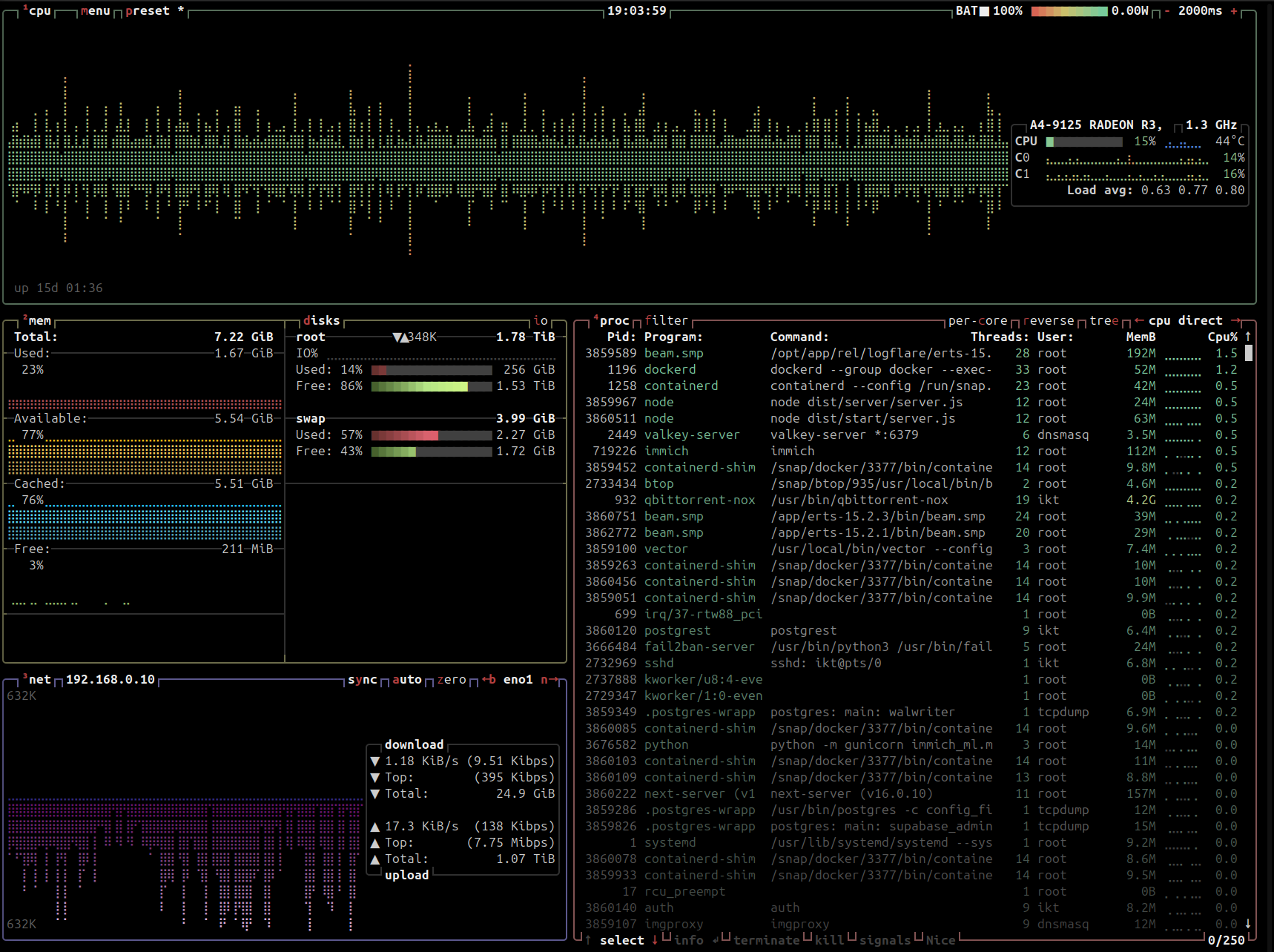
Works well enough for me, even though this might be the highest idle cpu usage I’ve ever seen (it’s not a fast cpu):
Btop: https://files.ikt.id.au/6c8kwp.png
My other servers are idling at like 0.1:
Htop: https://files.ikt.id.au/4uvrht.png
But I haven’t noticed any issues outside of immich taking longer if I go like, recheck all photos or starting up services, not a problem for me
was interested in this as well: https://www.ozbargain.com.au/node/934940
Seagate Expansion External Hard Drive HDD 24TB US$309.02 (~A$478.61) / 28TB US$353.02 (~A$546.76) Delivered @ B&H Photo Video
But haven’t dealt with USB attached storage before, I assume it would be fine but I’ll wait till I’m a bit closer running out of space
$ df -h Filesystem Size Used Avail Use% Mounted on /dev/sda2 1.8T 164G 1.6T 10% / /dev/sda1 1.1G 6.2M 1.1G 1% /boot/efiIn the same vein, used thinkcentres are dead cheap and good, easy to tinker with physically, and for what I know no problems when it comes to linux (nvidia drivers are probably as on any other platform). Got a ussf m920q IIRC, added som ram, changed the CPU and swappyd out the SSD for a big one and it became my main driver (also have some 710 and a tower for more inside space, GPU, …) low power draw and “it just works”.
100%, thinkcentres are the most well supported of the major brands iirc
the battery is a nice little in built UPS feature, bit underrated if you get a second hand laptop with a working battery
I take it ARM still not there package wise
I think for a lot of use cases it might be there. Unfortunately for me specifically, I think ARM might be the cause of part of my problems with Puppeteer, which is why I’m ruling it out.
You’re based in Brissy or further north in Qld, right? What kind of thermals does your system have, and what’s the room it lives in like?
haven’t dealt with USB attached storage before
I actually have, and if you’re interested I’d say go for it, with a couple of caveats. It worked great for me for years with my MediaWiki, torrents, and a couple of other minor web services hosted on my Raspberry Pi, with data stored on the USB external drive. I think it may have been a Seagate, even. Unfortunately I made the mistake of not backing it up, and when the external drive died I lost my data. That would be the biggest thing I’d consider if you’re looking into a USB external HDD. It’s extra important since the drive is probably not designed to be always on in the way a WD Red or equivalent is.
I actually wonder if RISC-V might overtake ARM in the linux world, the chinese are throwing a lot at it and I’ve seen very little out of ARM, I expected Linux to go the way of Apple where x86 is phased out and ARM is phased in because who wouldn’t like a lower power, cheaper CPU? or like wayland overtaking X.org but I just don’t see any great leap by desktops or laptops towards it, x86 has remained solidly in place outside of Pi like devices
Unfortunately I made the mistake of not backing it up, and when the external drive died I lost my data
😢 yeah good point, I’ll look at getting it to backup my main 2tb
You’re based in Brissy or further north in Qld, right? What kind of thermals does your system have, and what’s the room it lives in like?
Logan city! Was going to take a picture but it’s just a bunch of cables running along the side of my garage, the NBN conveniently comes into it far away from everything (I assume the only other front of house option (the kitchen) was out of consideration) can’t really say what temperature, it would def be mostly ambient temperature with a bit of extra heat coming from the solar battery when it’s charging but for the most part prob ambient outside temp
The laptop itself looks to sit around 50 degrees most of the time but this is pretty low power:
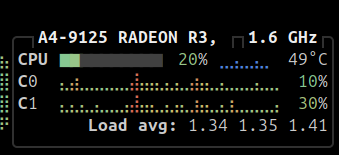
afaik the temperature being hot isn’t an issue, computer components (and most components in most things) prefer a stable high temperature 24x7 over going cold then hot all the time.
I think a mini-pc is a pretty solid choice regardless, I’ve had a 1ru rack server that was loud as fuck, fkin like 10 40mm fans! absolutely not worth it, and have friends who keep their servers/even old desktop PC’s running 24x7 in their bedrooms, these things are heat generators and in brissie if you don’t have a good aircon/airflow your room will got hot as shit and the fans will increase in speed so it’ll be either noisy and hot or both
I’ve no comments on RISC-V, but I agree that a move towards ARM in the Windows & Linux worlds would seem sensible. I would guess it hasn’t happened for the same reason IPv6 hasn’t taken over. Too much momentum. Too many developers still working in an x86 world, too many legacy apps that won’t easily run on ARM, too many hardware manufacturers each making the individual choice to keep making the current-popular option. Apple could transition because they’re the single gatekeeper. They make the decision, and everybody else who wants to use a Mac has to follow along. I’m going to guess that the control they have over the hardware and the software also means Rosetta 2 works a hell of a lot better than Microsoft’s Prism. (I can’t say for sure, having never used an ARM-based Windows machine or an ARM-based Mac.)
In terms of heat, what kind of room do you have it in? Somewhere with good natural airflow, or away in a closet somewhere?
In terms of heat, what kind of room do you have it in? Somewhere with good natural airflow, or away in a closet somewhere?
Just on floor in garage upside down so the laptop air vents face up, nothing special at all but main thing not in my office heating up the joint 🥲
What considerations do I need to think about in this?
Mostly just making sure it suits your power needs while also being efficient.
For now I’m likely to keep using Synology’s reverse proxy and built-in Let’s Encrypt certificate support, unless there are good reasons to avoid that.
I mean I don’t know much about those, but I don’t see any reason to continue doing that. Yunohost automates this stuff, if that’s what you’re looking for.
Is a second-hand Intel-based mini PC likely suitable?
Yes. Or AMD.
I read one thing saying that they can have serious thermal throttling issues because they don’t have great airflow
That’s entirely dependent on the specific Mini PC, processor, cooling solution, cooling profile, etc. Most of them are fine and if you have problems you can just crank up the fan speed. Unless you absolutely need to keep it in a living space.
Is there a particular reason to look at Intel vs AMD?
The one thing Intel is better at is hardware transcoding. So if you want to run Plex, Jellyfin, etc. it might be worth getting one of those.
Bonus question: what’s a good distro to use?
Pretty much everyone uses plain old Debian.
The piece of hardware I recommend to everyone who doesn’t have crazy massive storage needs is the CWWK pocket NAS.
Yunohost automates this stuff, if that’s what you’re looking for
I’m not familiar with Yunohost, but a really quick search makes it look like kind of a walled garden? I already have a walled garden with the Synology, and for a NAS I think that’s fine and I’m happy using the tools that come with it, but the shortcomings of such a system are precisely why I’m wanting to get a more standard Linux server to actually run my applications. If my first look at Yunohost is correct, I very much doubt it would be suitable for me.
Someone else suggested Caddy. And between their recommendation and some of the stuff I’ve come across when trying to install Nextcloud already, I think that if I do decide the Synology reverse proxy is insufficient, that’s probably what I’d go with.
I don’t see any reason to continue doing that.
The simple answer is just that it’s easy. I don’t have particularly complex needs right now. These two tools are already installed. I haven’t done very much with them, but what little I have done has shown itself to be really, really easy. And I don’t know what I would actually gain from a more manually approach. Definitely open to the idea of doing it myself if there is a particular reason for it though.
The one thing Intel is better at is hardware transcoding. So if you want to run Plex, Jellyfin, etc.
Ah ok yeah, thanks. So video transcoding is the only reason to consider Intel over AMD, then? I don’t have immediate plans to run Jellyfin, but it’s one of many things at the back of my mind I might want to do, so I’ll keep it in mind. It’s easy enough to have Jellyfin run on a server which accesses files stored on the Synology, and have transcoding take place on the server, right?
Thanks for all the help!
it look like kind of a walled garden?
Not at all. It’s completely open source.
The simple answer is just that it’s easy.
Yunohost makes it easy. That’s why I recommended it. It’s as simple as clicking a few buttons in the GUI.
So video transcoding is the only reason to consider Intel over AMD, then?
I don’t like to speak in absolutes but pretty much, yeah.
It’s easy enough to have Jellyfin run on a server which accesses files stored on the Synology, and have transcoding take place on the server, right?
Nothing’s ever easy in this self-hosting stuff but it should be pretty straightforward.
Not at all. It’s completely open source
Being open source doesn’t necessarily preclude being a walled garden. If (and I fully admit I could be completely wrong about this) it makes it easy to do certain things through a friendly UI, but it becomes much harder or more awkward (or impossible) to do things that aren’t explicitly supported, as part of a deliberate design decision/tradeoff for that usability.
Anyway, thanks a heap for answering all my questions. Has been very helpful.
The phrase “walled garden” pertains to the intentional exclusion of certain features based on the use of one platform. Based on that, I object to the description, but I digress.
At the end of the day it’s just Debian and you can do anything you want to do through the terminal. But it is meant to be a simplified process and you may run into roadblocks doing things that way, yes. You are pretty much limited to what’s on their (vast) catalog.
I’m not sure I agree with your definition of walled garden. I’d say it’s a place that’s designed to be nice and easy to use within the bounds designed for you (the garden), but which protects the user from doing something that might harm them, even if that “protection” comes at the cost of being able to do other things they want to do, in a kind of paternalistic way (the wall). The classic example would be iOS, where the only apps you can install are the ones Apple has approved for you. Getting apps from the open web the way you would on Windows, macOS, or Linux could be dangerous!
Your description of:
you may run into roadblocks doing things that way, yes. You are pretty much limited to what’s on their (vast) catalog
Makes it sound very much a walled garden to me. Not as high-walled as iOS of course, but it’s a spectrum.
But anyway, it’s basically semantics. Not that important what you call it.
My homelab runs off three Lenovo M920q systems - they have an optional PCIe riser in which I’ve installed a 10Gbe fibre card to handle storage. I grabbed them from an electronics recycling/reseller company - EpcGlobal.
If you’re in the States, I highly recommend them, although their stock changes frequently - https://epcglobal.shop/
I personally use my previous desktop PC with an i7-4790T CPU and 32GB Ram for selfhosting.
@jwildeboer shows his homelab in his blog using some Mini-PCs.
https://jan.wildeboer.net/2025/05/Cute-Homelab/
I would suggest, when you don’t need HDDs for storage reasons, to go with a refurbished Mini-PC with as much RAM as possible.
While I like his setup, I’m not a big fan of 3D printed components being added to the whole setup primarily because not everyone has a 3D printer lying at home …
The cost though it’s actually quite good I have to say.
@androidul I would say, selfhosting is doing the best out of available possibilities.
For me it is just an 11 years old PC, which was much to good to put to waste.My intention with the example from @jwildeboer was more about the usage of Mini-PCs than about their rack mounting.
But it also shows, what could be possible with more ressources.
deleted by creator
Bonus question: what’s a good distro to use?
I stick with Ubuntu 22.04 LTS (Jammy Jellyfish). Most people here seem to gravitate to Debian, which Ubuntu is a brother from another mother. As far as equipment, I wouldn’t waste my money on enterprise equipment or equipment older than 5 or so years years old unless you’ve got a mini nuclear power plant. Thing is, now days, with advancements in technology, it doesn’t take a lot to get a lot out of modern equipment.
Anything other than rolling release, as stability matters more when you are dealing with server setup. So, Ubuntu LTS, Debian should be good fit.
Unless you need the super-compactness of a mini PC, the Small Form Factor is a significantly greater value.
You get more horsepower, more space, and better cooling.
And they tend to be very quiet. Mine only has some fan noise when converting video, and it’s always running 2-5 VM’s (mostly Windows).
Really good to know, thanks!
This thread is helpful for Lenovo minipcs specifically: https://forums.servethehome.com/index.php?threads/lenovo-thinkcentre-thinkstation-tiny-project-tinyminimicro-reference-thread.34925/
My 12 years old Alienware M14x R2 [1] is doing great as a homelab. I have the following services running on rootless docker container:
- Nextcloud AIO
- Element
- AdguardHome
- Jellyfin
- SearxNG
- Vaultwarden
- … and few other services as well
So far, I managed to utilized around ~6 GB out 16 GB RAM. Throughput wise, it is doing great (over LAN and over Tailscale).
If you have any old laptop unutilized, you may try to repurpose it as one of your homelabs.
Acronyms, initialisms, abbreviations, contractions, and other phrases which expand to something larger, that I’ve seen in this thread:
Fewer Letters More Letters HA Home Assistant automation software ~ High Availability LXC Linux Containers SSH Secure Shell for remote terminal access VNC Virtual Network Computing for remote desktop access
[Thread #1006 for this comm, first seen 18th Jan 2026, 08:35] [FAQ] [Full list] [Contact] [Source code]
Oh, I used HA to mean high availability. I was not aware people also abbreviated Home Assistant.
Just throwing this out there since you may be in the market for equipment and subsequently RAM for said equipment…I’ve had good experiences with MemoryStock over the years. It’s at least good for a bookmark to consider later on if the need arises.
HP Microserver
Only if you have free / cheap electricity